In-Memory Lookups: When to swap temporary tables for dictionaries.
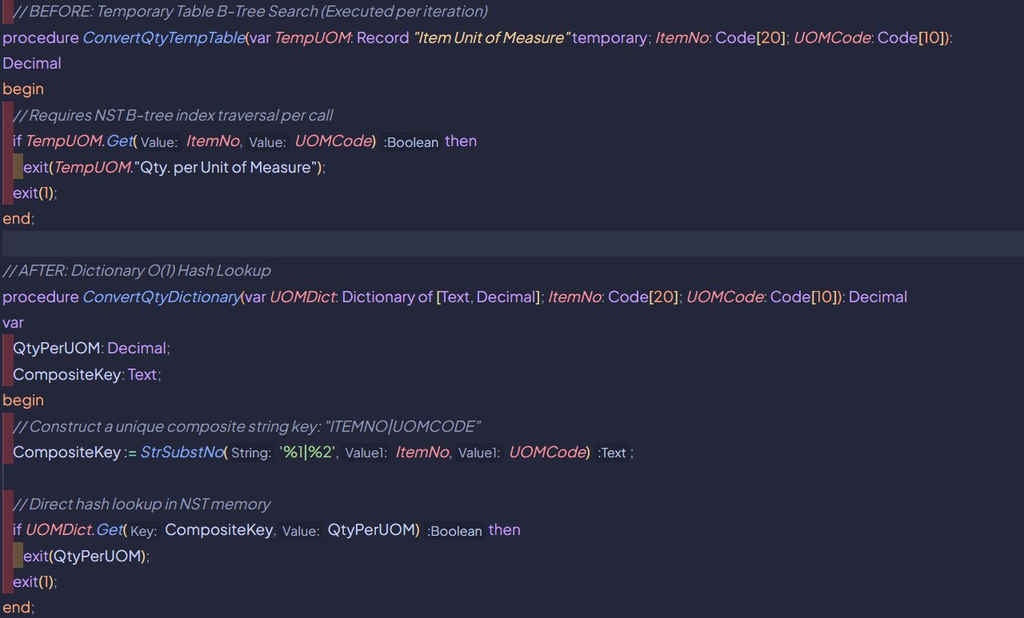
Consider a batch process that evaluates 10,000 inbound integration lines against a pre-loaded reference dataset (such as cross-reference mapping or unit conversion factors). A common design pattern is to load the reference dataset into a temporary table (Record “Item Unit of Measure” temporary) and call TempUOM.Get (…) inside the processing loop. While functionally sound, querying a temporary table millions of times inside a loop carries an unexpected CPU overhead.
⚠️ The Problem: B-Tree Index traversal
A temporary table in Business Central is not a raw C# dictionary or array. The Business Central server tier (NST) manages temporary tables as structured in-memory datasets complete with primary keys, secondary indexes and filter contexts. Every time TempRecord.Get(…) or SetRange(…) executes, the NST must traverse the internal B-Tree index structure to locate the target row.
🛠️ The Fix: HashLookups
In contrast, an AL dictionary uses hash table storage. Lookups via Dictionary.Get() or Dictionary.ContainsKey() execute in O(1) constant time by hashing the key directly, bypassing B-Tree index evaluation.
Why it matters
➡️ Reduced CPU Overhead: Replaces O(log N) B-tree node traversals with O(1) constant-time hash lookups.
➡️ Faster Loop Execution: In high-frequency loops (100,000+ lookups), hash table access significantly lowers elapsed server CPU time.
➡️ Zero Database Impact: Both approaches operate strictly within NST memory without issuing SQL queries during the loop.
☣️ The Trap
When Temporary Tables Are Still Better: Dictionaries only support exact single-key matches. If your lookup logic requires ranges (SetRange), sorting (SetCurrentKey), flowfields, or multi-field filtering, temporary tables remain the correct and necessary choice. Do not attempt to re-implement range filtering in dictionaries.
💡 The Bottom Line
Use temporary tables when you need relational queries and ranges. Use dictionaries when you need high-frequency, exact-key lookups.