The “DataClass” Trap: Why Standard Tables Cripple Integration Performance.
Using a Standard table type for staging large JSON payloads (e.g., 10,000 orders) forces every insert and update to be logged in SQL Server’s transaction log. Telemetry shows this design choice leads to compounding disk write latencies, even when the query logic itself is efficient. The fix isn’t an index or a Commit(). It’s simply changing the table property to DataClassification = Temporary, bypassing the transaction log entirely. This small adjustment transforms integration throughput by eliminating unnecessary persistence overhead.
⚠️ The Problem: High input/output staging table
When you create a standard table in AL to hold temporary integration payloads or staging data, Business Central treats it with full transaction durability. Every single insert, update, or delete triggers heavy synchronous writes to the SQL Server transaction log, full cloud replication, and change tracking overhead. If this data is transient : meaning it is processed, mapped, and immediately deleted, you are paying a catastrophic database input/output tax for data that doesn’t actually need long-term protection.
🛠️ The Fix: Weaponizing TableType = Temporary / Inverted Data Flow
Instead of dumping data into physical SQL tables, we have two hidden architectural plays that we can use to keep the database lean:
✅ The TableType = Temporary Schema Definition: If multiple objects or background sessions need access to a staging structure but the data doesn’t need to persist after the session dies, define the physical table object with TableType = Temporary. This forces the runtime to handle the data entirely in the Middle Tier memory or local temp storage, entirely bypassing SQL log writes.
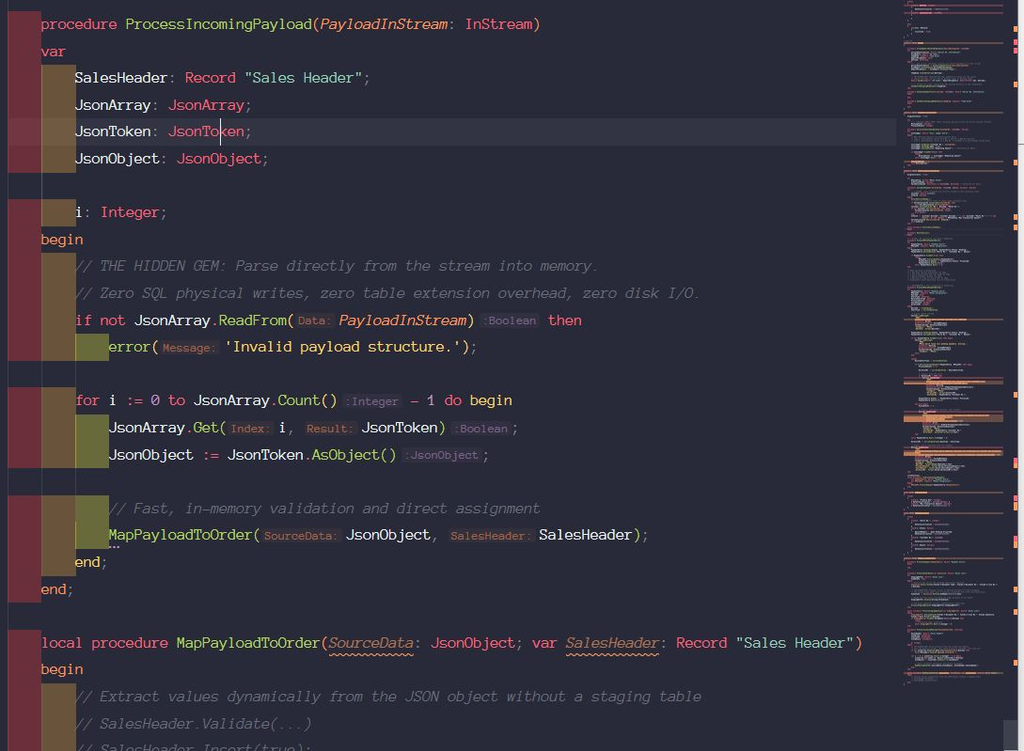
✅ The Memory Buffering Pattern: Build your API endpoints to stream payloads into a BigText or InStream, parse them entirely in memory using standard AL JsonObjects, and map directly to destination tables without ever writing a temporary row to disk.
Why It Matters
➡️ Near-Zero SQL Write Latency
➡️ Zero Cloud Storage Bloat
➡️ Reduced Deadlocks
☣️ The Trap
If you use TableType = Temporary, remember that the data is strictly bound to the current session; if a background job queue fails, you cannot inspect the staging table in the client to debug what went wrong.
💡 The Bottom Line
Every row you write to a physical disk should be a row that belongs there permanently. For transient integration data, keep it in memory or keep it temporary.
Are you still relying on physical staging tables for your APIs, or have you transitioned to pure in-memory stream parsing?