Stop the Wait: Mastering Page Background Tasks (PBT)
Ever opened a Record Page and been stuck watching the spinning wheel while a BC page crunches numbers? That’s a user experience killer.
✖️ The Problem: Blocking UI
By default, AL runs synchronously, that means if your page calls an external API or crunches complex totals inside OnAfterGetCurrRecord, the page is locked until the work is done.
👉The user can’t click, type, or scroll – they’re stuck watching the spinning wheel.
👉Heavy logic in pages = frozen UI and frustrated users
🛠️ The Fix : EnqueueBackgroundTask
Instead of blocking the main page while calculations or API calls run, the page itself loads immediately. The background session quietly does the work, and once it’s finished, the results appear –> almost like the data “pops in” after the fact.
👉 The user gets a fast, responsive page.
👉 The heavy lifting still happens, but out of sight.
👉 The experience feels seamless, with no frozen UI
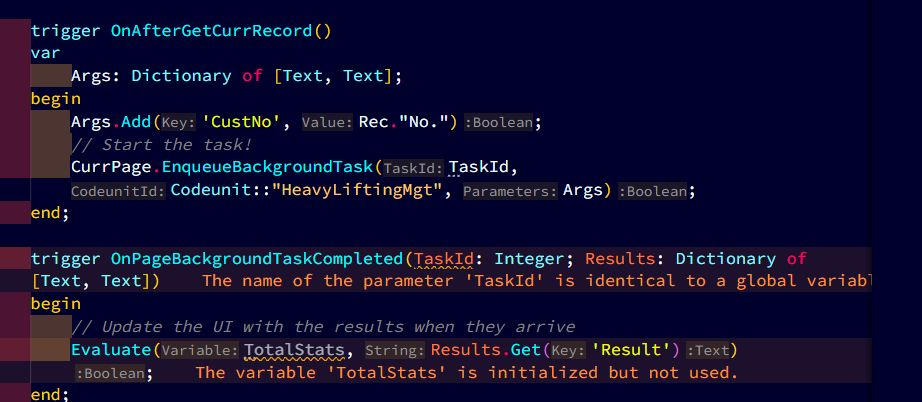
💡 Pro tip:
✅ Read-Only Only: Background tasks cannot perform database writes (Insert/Modify/Delete). They are strictly for calculations and data fetching.
✅ Keep it Small: Pass data back and forth using a Dictionary. If you have complex data, serialize it to JSON.
✅ Fail Silently: If a background task errors out, the user doesn’t see a crash, the task just stops. Use OnPageBackgroundTaskError to handle failures gracefully (e.g., showing “N/A” instead of a blank space).
⚡Bottom line
Foreground –> Fast operations, but the user is stuck waiting.
Background Tasks –> Slow operations, but the user keeps working.
45 seconds frozen UI = frustrated users + support tickets.
45 seconds in the background = smooth experience + happy users.
One EnqueueBackgroundTask() = responsive pages + better UX.
Next time you’re about to run a heavy operation in a page action, pause and ask: “Should this be a background task?”
Your users will thank you.