Record not open…Taming RecordRef in Business Central
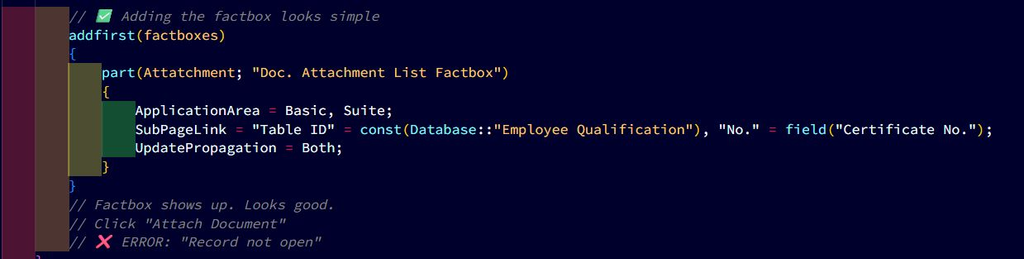
Ever tried adding the Document Attachment FactBox to a custom table and hit “Record not open”? Here’s how I solved it and how you can avoid the same trap.
✖️ The Problem: Standard factbox doesn’t know your table.
The standard document attachment uses RecordRef. If you don’t handle it correctly, it breaks. What’s really happening behind the scenes? When you add the standard Document Attachment FactBox to a custom table, Business Central springs into action:
➡️ It tries to open a RecordRef
➡️ It looks for your record
➡️ But… it doesn’t know how to handle your custom table
➡️ The RecordRef is never properly opened
➡️ Result: “Record not open”
Why? Because the standard logic only knows about built-in tables like Customer, Vendor, Item. Your custom table? It’s invisible to the default code.
👉 That’s why you need to step in, open the RecordRef yourself, and teach BC how to work with your table.
🛠️ The Fix: Subscribe to two events
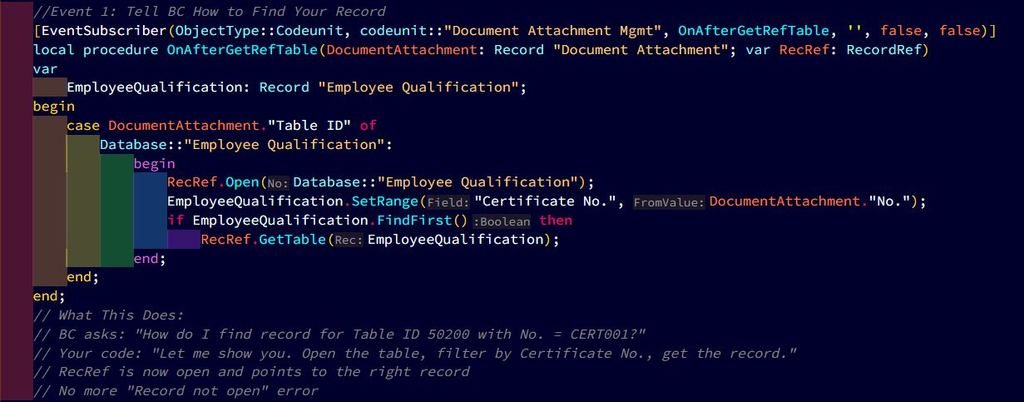
Event 1: Tell BC How to Find Your Record
[EventSubscriber(ObjectType::Codeunit, codeunit::”Document Attachment Mgmt”, OnAfterGetRefTable, ”, false, false)]
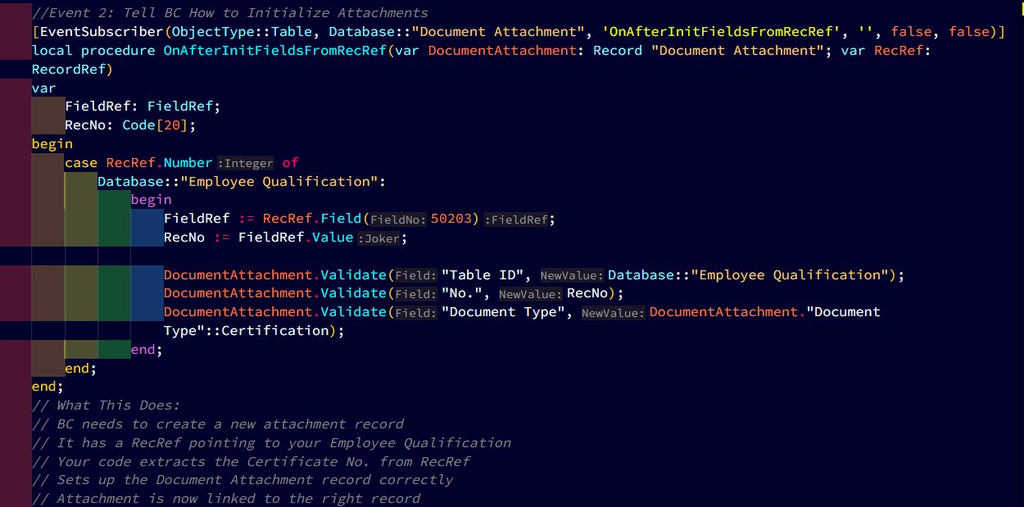
Event 2: Tell BC How to Initialize Attachments
[EventSubscriber(ObjectType::Table, Database::”Document Attachment”, ‘OnAfterInitFieldsFromRecRef’, ”, false, false)]
‼️ A RecordRef is not a record. It’s an empty container. If you try to use it without opening it, you’re basically asking Business Central to fetch data from a box that hasn’t been unlocked yet.
✅ Open before filling → Always call RecRef.Open(TableID) first. This unlocks the container.
✅ Bind with GetTable → Once you’ve applied filters and found your record, use RecRef.GetTable(Rec) to bind the actual record into that container.
✅ Access with FieldRef → If you need to read values without hard-coding record variables, FieldRef lets you peek inside the container safely.
👉 This pattern is what makes RecordRef so powerful. It gives you late binding, meaning your code can stay generic and still integrate with standard features like Document Attachments. But it also means you must respect the lifecycle: open → bind → access.
💡 The Bottom Line
Document Attachment factbox for custom tables = Two event subscribers + RecordRef handling.
First, you must unlock it → RecRef.Open(TableID)
Then, you place something inside → RecRef.GetTable(Rec)
Next, you can peek inside safely → FieldRef.Value
Finally, don’t forget to close it and handle errors
If you skip the unlock step, you’re just shaking an empty box and that’s why Business Central throws “Record not open.”