From SecretText to SecretVault: Why isolated storage is the missing piece
Last week we locked down passwords with SecretText. This week, let’s talk about where those secrets live. Because if you’re still saving them in a Setup Table, they’re not really secret, they’re exposed. The best bet is to move your sensitive data into the Vault: Isolated Storage.
✖️ The Problem – “Open Door”
Think your secrets are safe in a custom table? Think again.
Store a password in a Text or Blob field, and any user can hit Inspect (Ctrl+Alt+F1) and see it.
It’s sitting unprotected in the SQL database, unless you’ve gone out of your way to manage encryption.
Every database export or backup carries those credentials right along with it.
In other words: your “secure” table is really an open door.
🛠️ The Fix – Isolated Storage
Microsoft Dynamics 365 Business Central provides Isolated Storage as the secure alternative to table fields.
✅ Encrypted & Isolated: Data is stored in a separate, encrypted partition of the Business Central service. It’s not part of your standard table data, and it’s hidden from the UI and SQL database.
✅ Extension-Scoped: Each extension gets its own isolated storage. Keys/values saved here cannot be accessed by other extensions, ensuring strict separation of secrets.
✅ Minimal Surface Area: Only two fields exist the key and the value. This simplicity reduces exposure and makes it ideal for storing passwords, tokens, license data, or API keys.
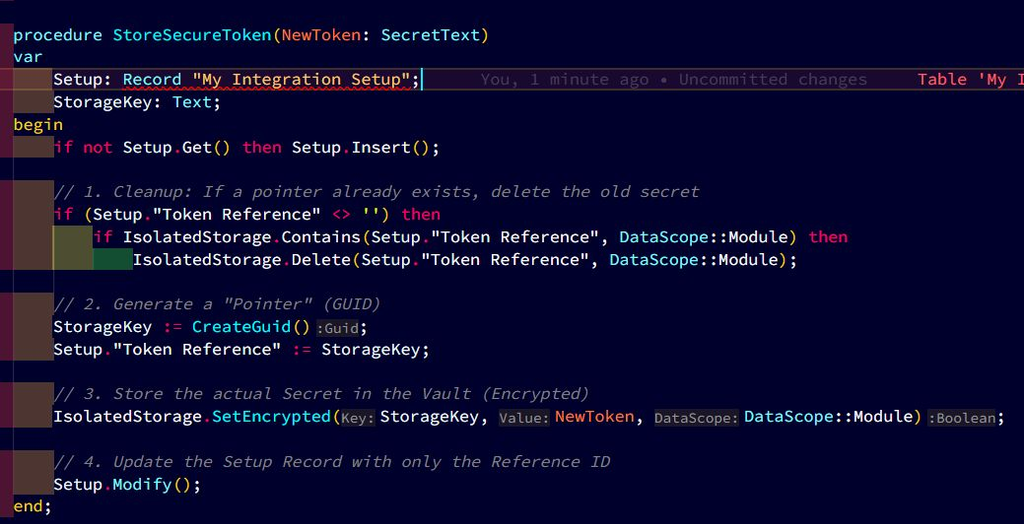
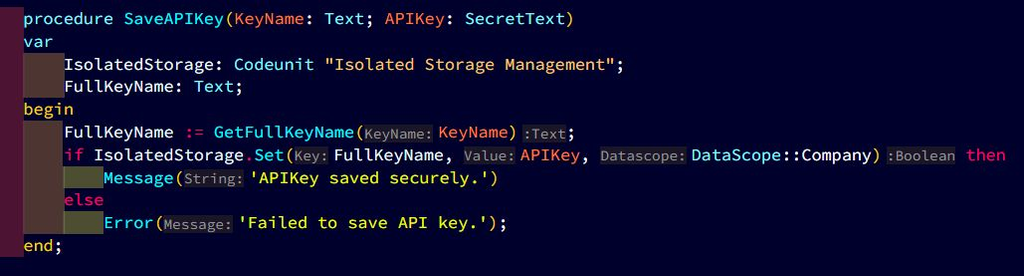
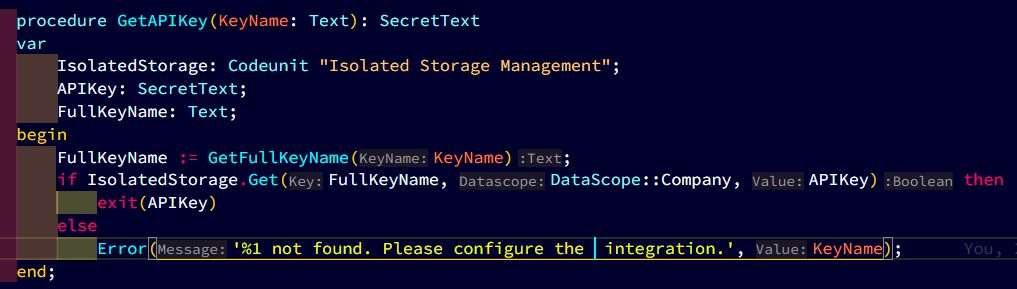
✅ API-Driven Access: Developers interact with Isolated Storage using AL methods like Set(key, value, DataScope) and Get(key, DataScope, var Text). This ensures controlled, programmatic access rather than exposing secrets in tables or exports.
✅ Audit-Friendly: Because secrets are excluded from standard tables, backups, and exports, auditors see that sensitive data is properly segregated and encrypted.
💡 Choosing Your Scope – The “Who Can See It?” Rule
Think of Isolated Storage like a secure facility with different kinds of locks. The DataScope decides who gets the key:
👉 DataScope::Company → The Company Safe
A big safe in the lobby. Everyone in the company can open it. Perfect for shared API keys that multiple users need.
👉 DataScope::User → The Personal Locker
A locked locker with your name on it. Only you can open it. Best for personal credentials like OAuth tokens or user-specific passwords.
👉 DataScope::Module → The Extension Vault
A vault in the basement, accessible only to your extension. Other extensions can’t even see it exists. Ideal for keeping third-party apps from “peeking” at your secrets.
➡️ The Bottom Line:
If your sensitive data is still sitting in a plain-text table, you’ve left the door wide open.
Move it to the Vault today. Protect your users. Pass your audits. Sleep better.