SIFT: The Secret to Instant Totals (Sum Index Field Technology)
Last week we talked about SQL Indexing to find records faster. But what if you don’t want to find records, you just want the total?
Looping through 100,000 ledger entries to sum an “Amount” is like counting grains of sand one by one. In Business Central, we use SIFT to let the system do the math instantly.
✖️ The Problem: Manual loop
Many developers still write loops to calculate totals. This pulls every single row from SQL into the middle tier, consuming memory and bandwidth.
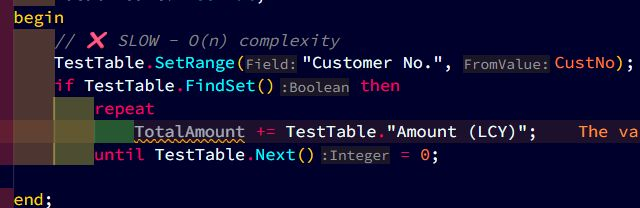
🛠️ The fix: Calcsums + SIFT
When you use CalcSums, Business Central does not necessarily read the records. If a SIFT Key exists, SQL maintains a special “hidden” table that stores pre-calculated totals.
To make this work, you must define the SumIndexFields in your key.

💡 Why This is a Game-Changer
FlowFields: This is the engine that powers FlowFields. If your FlowField is slow, it’s usually because the underlying SIFT key is missing.
Zero-Row Reads: SQL doesn’t scan the main table,it looks at a tiny summary table.
Consistency: The total is updated the moment a transaction is committed.
💡 The Bottom Line
Every SIFT index you add makes reads blazing fast, totals appear instantly. But remember, Inserts and Deletes get slightly slower, because SQL has to update the summary buckets each time.
Rule of Thumb:
✅ Add SumIndexFields to keys used often in reports, dashboards, or FactBoxes.
❌ Skip fields you only sum once a year, loops or Query objects are better there.
Think of SIFT as a calculator built into your table: amazing when you need totals on demand, but wasteful if you never press the button.
Is your Balance column spinning? You’re probably missing a SIFT index.