Partial Records + AddLoadFields: The Hidden Performance Boost in Business Central AL
Most developers stop at SetLoadFields and think they’re done optimizing. But here’s the catch: loading too many fields wastes resources, and touching a field you didn’t load triggers a hidden fetch that kills performance.
The real win? Combine Partial Records with AddLoadFields deliberately, load only what you need, when you need it. That’s how you keep loops lean and your UI lightning fast.
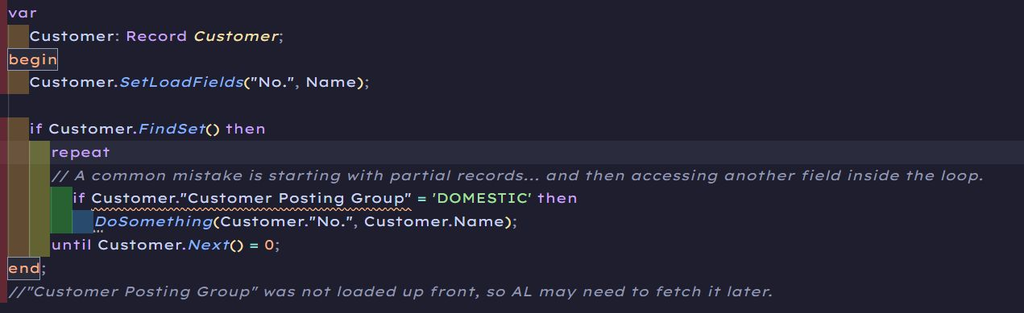
❌ The problem: Touching an unloaded field later.
Partial records look like a performance win, until you access a field you didn’t load. That’s when Business Central quietly performs a Just-In-Time (JIT) load from SQL.
🛠️ The Fix : Use AddLoadFields when requirements grow.
The solution is simple: tell Business Central exactly which fields you want loaded up front. That’s what AddLoadFields does. If you realize you need more fields, don’t abandon the partial-record pattern. Extend it cleanly with AddLoadFields.
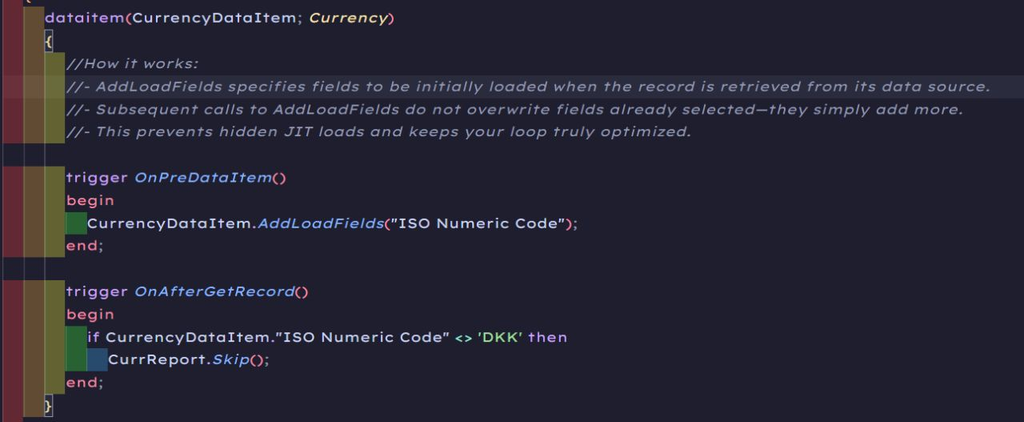
Why this is better:
✅ You keep your intent explicit.
✅ You still avoid loading everything.
✅ And you prevent hidden extra fetches later.
💡 Pro Tip
Only fields of FieldClass = Normal are supported as input values for the Fields parameter. If fields of FieldClass = FlowFilter or FieldClass = FlowField are passed, the return value will be false if observed; otherwise, a runtime error will occur.
✴️ The Bottom Line
SetLoadFields isn’t just a performance switch, it’s a mindset.
Start small.
Load intentionally.
Expand with AddLoadFields when the use case grows.
That’s how you get performance without overfetching. ✅