DataTransfer: Moving Millions of Rows in Milliseconds!
✖️ The problem – row by row insert
Still looping with repeat…until to push rows from a staging table into a live table? Even with SetLoadFields, you’re still doing row-by-row inserts a massive bottleneck for large datasets.
🛠️ The Fix – Data Transfer Object
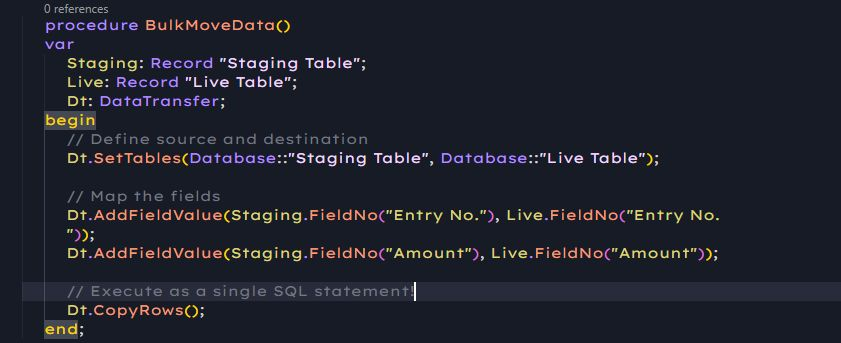
The set-based way to move millions of rows in milliseconds. Instead of thousands of tiny operations, you execute one optimized SQL batch.
➡️ SQL-Level Speed
Instead of bringing data into the AL service tier, modifying it, and sending it back, DataTransfer tells SQL to move the data directly within the database. It can turn a 10-minute migration loop into a sub-second operation.
➡️ CopyFields vs. CopyRows
CopyFields: Updates existing records in a target table using data from a source table (like a SQL UPDATE JOIN).
CopyRows: Inserts entirely new rows into a target table (like an INSERT INTO…SELECT).
➡️ The “Trigger” Trade-off
DataTransfer is lightning fast because it bypasses AL triggers (OnInsert, OnModify).
Use it for heavy-duty data migrations or archiving where speed is the priority.
Avoid it if your logic relies on complex table-level validation code that must run for every record.
💡Pro‑Tip: DataTransfer for Upgrades
Because DataTransfer executes directly at the SQL level, it’s incredibly efficient for Table Extension migrations during app upgrades. You can move millions of rows in one shot.
⚠️ But remember: no AL triggers or business logic will run for the records being moved this is pure set‑based SQL. Plan accordingly if you rely on validations or events.
💡 The Bottom Line
If you’re moving more than 1,000 records, stop looping.
Stop row-by-row inserts.
Start transferring with DataTransfer and watch execution times collapse from hours to seconds.