The Task Scheduler Ghost: Solving the “Job Queue Hang” with Surgical Isolation
No errors. No crashes. Just a line of 20 tasks stuck in “In Process” for hours. The culprit? Every single task was locked in a battle to update the same “Sequence No.” field on a setup table. They were not just running code, they were holding the database hostage in a synchronized deadlock dance. One tiny shared resource became the bottleneck for the entire queue.
⚠️ The Problem : High concurrency bottleneck
When we trigger heavy processes via TASKSCHEDULER.CreateTask, we often forget that these sessions are independent. If 10 tasks wake up at once and all try to write to the same Integration Setup record, you get Lock Timeout errors or, worse, a complete throughput standstill.
Standard background tasks in AL are “greedy”. They start a transaction, lock the schema they touch, and don’t let go until they finish or fail.
🛠️ The Fix : Non Blocking reads with Read Isolation
Since we can’t (and shouldn’t) bypass the transactional nature of the Task Scheduler, we use Read Isolation. By explicitly telling the platform how to handle the lock-state of a record, we can allow our “Checkers” to see the data without getting stuck behind a “Poster.”
➡️ Technical Grounding
✔️ Saas Available : Yes
✔️ Runtime/Upgrade : Runtime.
✔️ Bypasses Triggers : No
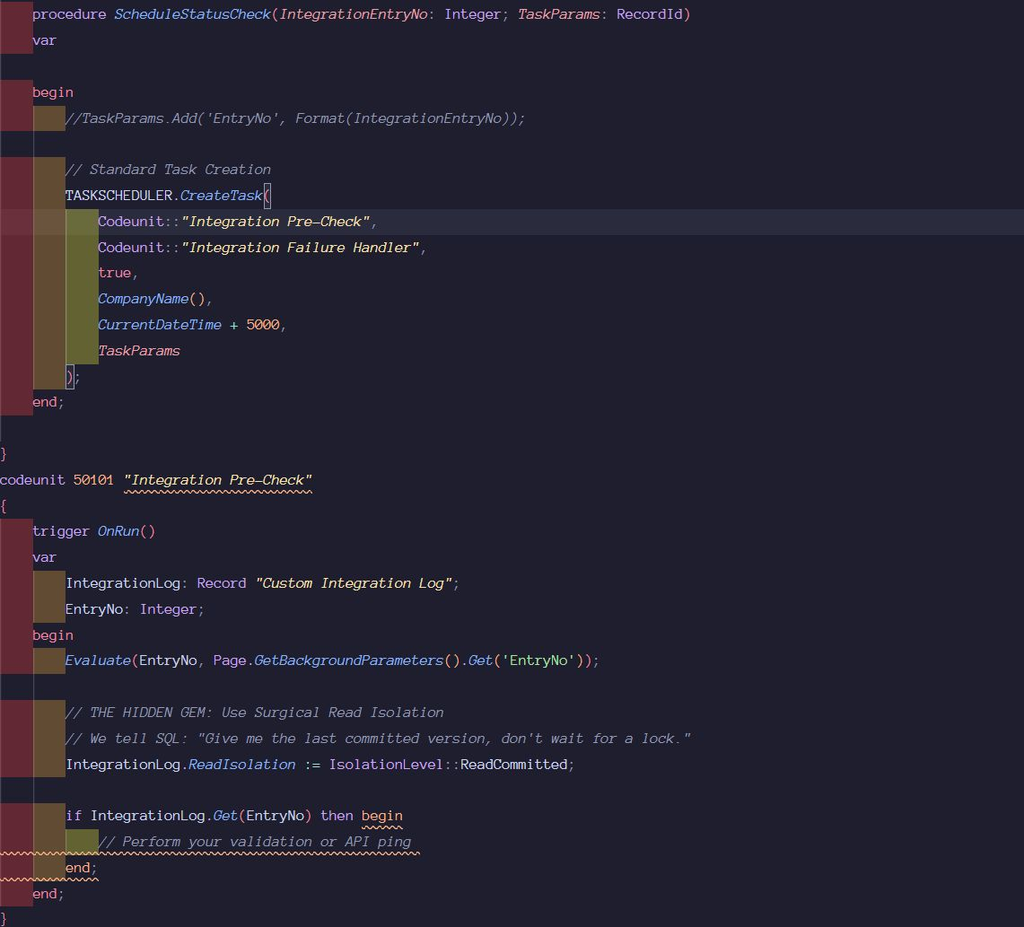
✅ Why it Matters
▫️ Throughput Stability: Your background “Checkers” no longer die because a “Poster” is holding a lock for 2 seconds.
▫️Zero Ghost Tasks: Drastically reduces sessions that hang in ‘In Process’ state due to SQL wait stats.
▫️Resource Efficiency: Lower CPU pressure on the SQL instance by reducing the complexity of the Lock Manager’s workload.
☣️ The Trap
Never use this for “Writing” logic. If you need to modify the record after reading it, the platform will escalate the lock anyway, potentially negating the benefit. Use this for pre-flight checks and status monitoring
❇️ The BottomLine
Perfect for polling patterns where you need to hit an external endpoint frequently without hammering your Business Central database.
Keep the load outside BC, keep the core system fast, and let SQL breathe.